

Outdoors
Sponsored by

Inherited the farm. Bought the tech. Turns out this dummy needs a GPS guidance tutor

2,018 Views | 14 Replies | Last: 13 hrs ago by Centerpole90
mhnatt
How long do you want to ignore this user?
Howdy!

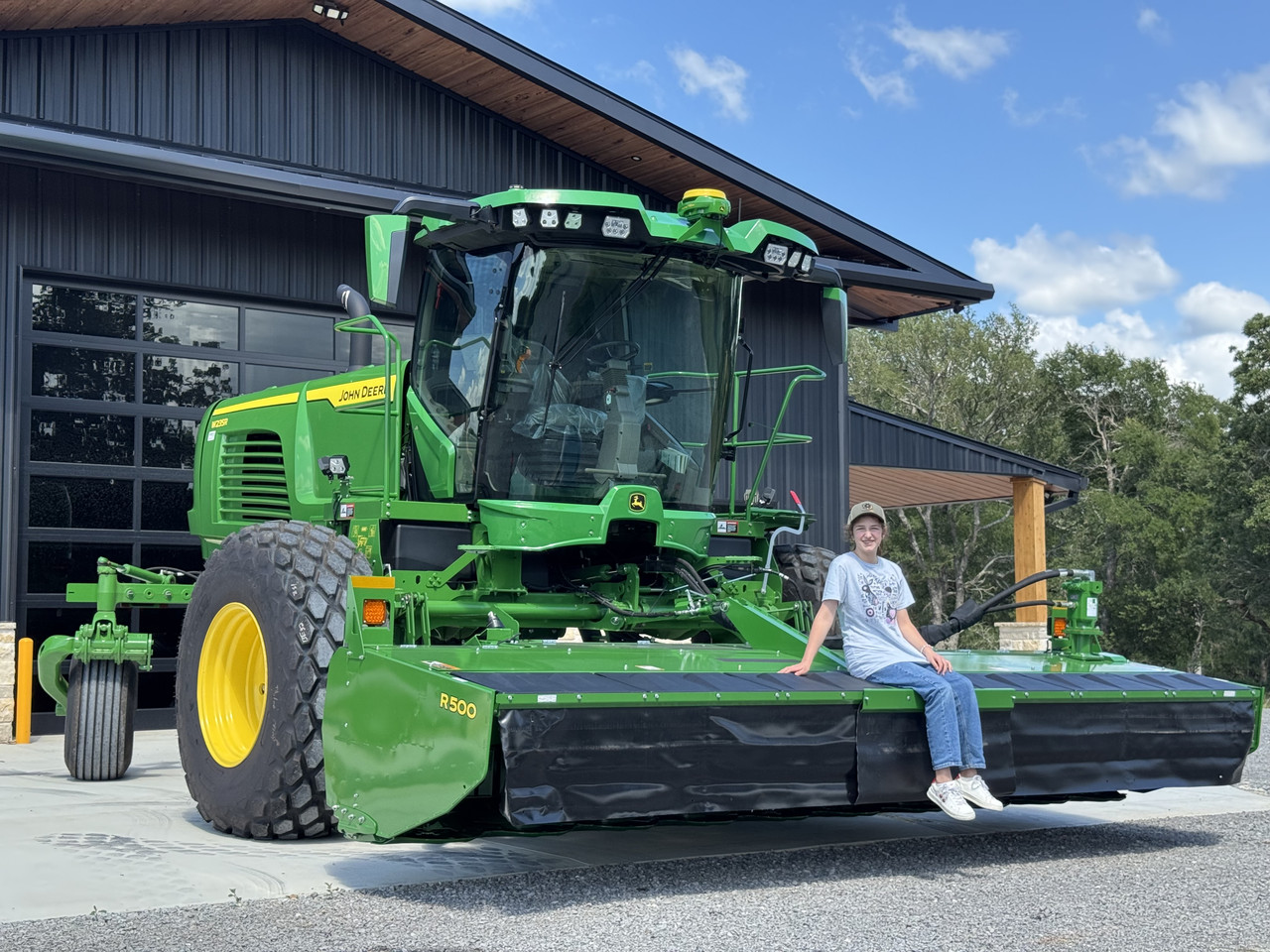
I recently bought a JD W235R windrower with a Gen4 AutoTrac setup, and I also have another tractor that I retrofitted with a different guidance system.

The problem is that I've never used any ag guidance technology before. Just a few hours after the windrower was delivered, I left with my family for a trip to Wisconsin, so I haven't had much time to dig into the manual. I've watched videos and talked with service techs from both John Deere and Kubota, but most of the material seems to assume I already know the basics.

I've spent most of my life as a software developer. While I grew up on a farm, my dad and I never used GPS guidance systems. Now that I've taken over the farm after his passing, I'm trying to learn technology that's completely new to me.

So I'll admit it: this dummy needs a tutor.

If there's a student, former student, or experienced operator in the College Station area who would be interested in providing some one-on-one training for pay, I'd sure appreciate it.

I live in College Station, and the equipment is near Calvert (about 35 miles north).

Thanks!

mike (at) hnatt.com

PS - my youngest daughter in the pic

EDIT: I gave an explanation and credit to our good local dealer from United Ag in my follow up comment just two posts after this one.
AgResearch
How long do you want to ignore this user?
AG
Your dealer should absolutely provide you an on-site setup and walk through service on a new machine at no cost. All our (both Deere and CaseIH) dealers will come out and show how to run the machine and electronics after purchase.

Assume that's a $200-300k machine. You paid for that service call already.
mhnatt
How long do you want to ignore this user?
You're absolutely right, and to be fair to the dealer, I left for Wisconsin just a few hours after the machine was delivered, so we never really had the opportunity to do a proper walkthrough. I'm also starting from zero on guidance systems and trying to learn two different platforms at once. The dealer has been helpful, but I'm looking for more of a "GPS Guidance 101" tutor who can help me understand the underlying concepts rather than just the buttons on a particular display. I also don't expect someone to spend hours teaching me fundamentals for free that most operators already learned years ago.
BlitzGD
How long do you want to ignore this user?
AG
Play any of the Farm Simulator series? FS22 or FS25 have pretty good guidance stuff in them...
Quarterback can't throw the ball lying on his back.
mhnatt
How long do you want to ignore this user?
Someone said similar on a forum. Imagine my CPA seeing "Xbox" on my tax deductions and telling the kids that dad needs to use their gaming system! :P
panhandlefarmer
How long do you want to ignore this user?
AG
Just call your dealer and tell them to get your Precision Ag tech out to ride with you and show you how to use it. Simple.
Centerpole90
How long do you want to ignore this user?
AG
30 rack of stones
Call the AGSM department and tell them you problem
?????
Profit.
EskimoJoe
How long do you want to ignore this user?
We, include a "field start" when we sell a new unit. It would be safe to assume your dealer does as well. I don't know if your dealer will send out a your salesman, the precision farming guy, or someone from the service dept, but I bet you could get someone out if you call your salesman.
travis_mabry
How long do you want to ignore this user?
AG
Bought a Krone from ASCO this spring and they sent their farm tech rep out months after it was delivered to go over everything. That is an expensive unit make them earn that money!
mhnatt
How long do you want to ignore this user?
Thanks for all the replies and suggestions. The OB as a collective will outdo GPT any day!

The dealer has actually already agreed to come out when we start cutting and spend a couple of hours with me, which I greatly appreciate.

What I'm really looking for is more like "ground school" before I actually begin cutting. I grew up on tractors with zero electronics, so I'm making about a 40-year jump in technology all at once. Many producers grew into guidance systems one generation at a time.

It's like someone who flew older airplanes decades ago buying a new aircraft with modern avionics. The dealer can only show them so much in a couple hours, but I don't want my first exposure to modern avionics to be during my first cross-country flight.

I'm hoping to learn enough now that when the dealer comes out, I'm asking good questions instead of trying to absorb everything for the first time while hay is on the ground and weather is moving in.
regularjoe
How long do you want to ignore this user?
AG
I have a good friend that worked at John Deere for a few decades, but not anymore. He may be willing to come out and spend some time with you. Want me to ask him and connect y'all?
Codes12
How long do you want to ignore this user?
AG
I'll be happy to answer any question I can help with. Are you looking for pointers on both the windrower and the tractor? We farm in El Campo and run a mix of Trimble and JD screens. I have played around with a 4240 display and overall its pretty easy to get the hang of but I do have a lot of experience with tractor guidance. I'm more familiar with with the older JD 2630 screens. I would recommend using goolge on you equipment. There should be some cheat sheets out there as well. Youtube has quite a few decent "how to videos" from JD dealerships. Being your windrower is the only thing running off your gen 4 display it should be pretty forward to set up and create and A + B line. If you have any direct questions I will try my best to answer them for you.
mhnatt
How long do you want to ignore this user?
Thanks regularjoe (yes please if you have a contact - mine is mike (at) hnatt.com)!

Thanks Codes12! The dealer just said to search YouTube for videos but I've mostly found short 2-3 minute clips and all of them assume am that the viewer has a basic foundation which I don't have. Since my fields are very irregular shaped, I've learned that a Boundary Fill should work best (over A-B line).
Codes12
How long do you want to ignore this user?
AG
Gotcha. I just assumed A + B because that is what we use in the row crops. I think you'll get the hang of it pretty quickly once you get it in the field and start playing with it. One thing is make sure you name/label things clearly once you start making boundaries/lines/fields. I get in a hurry from time to time and end up with 20 lines labeled Track 1, Track 2, ect. Then it just turns into a guessing game trying to find the line you are looking for next time you try to go back to a field.
Centerpole90
How long do you want to ignore this user?
AG
My brother - wait until you (and maybe you do and haven't said so) send a non-English speaking, past middle aged, set of drivers, whose exposure to tech is a smartphone at best - out into the world with Gen4 displays. Don't get me wrong, I love these guys / they're my family during daylight hours and I couldn't do what we do without them. This isn't a knock on them, instead, it's comic relief of some of the things I have had to UN-F* in displays and have seen for guidance line names.

It's better in the Deere universe than it was in AutoFarm/AgLeader - but I've had guidance lines named: my phone number, my marendomo's phone number, the model of the tractor, code to the barn's security system, "AYUDO" (if the system was said in Spanish), "HELP" (when it was an English), and every possible combination of the tract name you can think of. It doesn't help that every field on the farm has at least three different names. There's its English name, it's Spanish name, and every name that it gets for each particular driver who came along later and didn't learn the real name. So to make things simple I'm the only one who gets to name boundaries - but guidance lines can really be a comedy.

We tried the displays in Spanish for a while, but my foreman, who doesn't speak or read English, came and said "hey I think we were better off in English because the guys get too brave when they can actually read the words and it creates more problems. I think it was better when it was a mystery. I remember the button presses just leave it in English."

ETA - how did I forget the channel for the RTK base station. That's another common when the guys type in to try to get the screen to go away. Lol.
Refresh
Page 1 of 1
 
×
subscribe Verify your student status
See Subscription Benefits
Trial only available to users who have never subscribed or participated in a previous trial.